Spam Traffic in GA4: How to Detect, Filter & Prevent It
Introduction
Google Analytics 4 (GA4) has transformed the way we measure user behavior, but the platform is still vulnerable to the same noisy data that plagued Universal Analytics—spam traffic. Whether it arrives as fake referrals, ghost hits, or manipulated events, spam can skew session counts, inflate conversion rates, and waste marketing budgets.
In this guide you will learn:
- What spam traffic looks like in GA4 and why it matters.
- Proven methods for detecting spam, from built‑in reports to custom queries.
- Step‑by‑step filtering techniques that keep your data clean without breaking downstream integrations.
- Strategies to prevent future spam attacks, including server‑side safeguards and proactive monitoring.
All examples use the GA4 interface, Google Tag Manager (GTM), and the GA4 Data API, so you can implement solutions today, regardless of your technical stack.
What Is Spam Traffic in GA4?
Definition
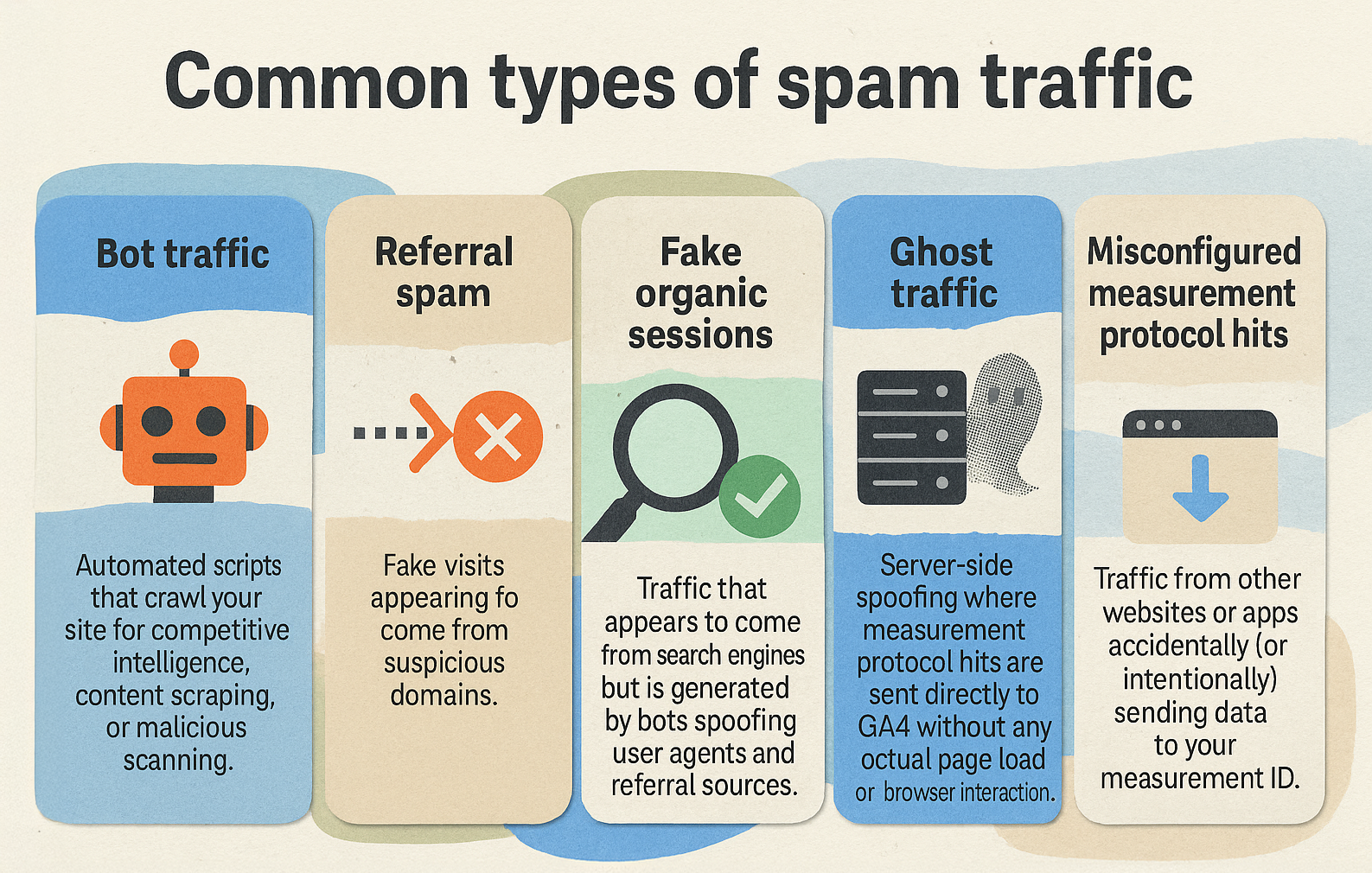
Spam traffic refers to any hits that do not represent genuine user interactions but are artificially generated to manipulate analytics data. In GA4, spam can appear as:
- Referral spam – fake referral URLs that appear in the “Traffic acquisition → Session source/medium” report.
- Ghost sessions – hits that never trigger a page view or event, often injected via bots that send HTTP requests directly to the Measurement Protocol endpoint.
- Manipulated events – artificially inflated clicks on custom events, usually via automated scripts.
Why It Matters
- Misleading insights – inflated session counts can hide real user drop‑off points.
- Budget waste – paid campaigns may appear more successful than they are, leading to overspend.
- Data integrity risk – downstream dashboards, ML models, and reporting APIs inherit the corruption.
How Spam Traffic Manifests in GA4 Reports
Referral Spam Patterns
| Symptom | Typical Manifestation | Example Entry |
|---|---|---|
| High volume, low engagement | Sessions with 0 pages, 0 events, 0 conversions | source: (direct) / (none) but referrer: example‑spam.com |
| Unusual geographic spread | Sessions from countries you don’t target | Sessions from “Iceland” showing 500 sessions/day for a niche B2B product |
Ghost Hits
- Zero‑duration sessions – hits recorded with a session duration of 0 seconds.
- No page_view – only custom events (e.g.,
click) are logged, but no accompanyingpage_view. - High event‑to‑session ratio – spikes in event counts that do not translate into increased page‑view metrics.
Event Spam
- Repetitive event parameters – the same
event_nameandparametervalues appear thousands of times per minute. - Unusual parameter values – e.g.,
page_locationset to “http://spam‑tracker.com” orpage_titlecontaining random strings.
Detecting Spam Traffic
1. Built‑In GA4 Explorations
- Create an Exploration → select “Free‑form”.
- Drag Session source/medium, Page location, and Event count into the dimensions.
- Add Sessions, Engaged sessions, Conversions as metrics.
- Sort by Sessions descending and look for rows with 0 engaged sessions and high session counts.
Example: A row showing Referral: best‑traffic‑club.com with 12,000 sessions but 0 engaged sessions is a red flag.
2. Using the “Traffic acquisition” Report
- Navigate to Acquisition → Traffic acquisition.
- Add a secondary dimension Session default channel grouping.
- Filter on Sessions > 1000 and Engaged sessions = 0.
3. Leveraging Custom Queries via the GA4 Data API
The GA4 Data API lets you query raw event data with precise filters. Below is a Python snippet that extracts sessions with no page_view but at least one custom event:
import google.cloud.bigquery as bq
from google.cloud import bigquery_client

client = bigquery.Client()
query = """
SELECT
  event_date,
  event_name,
  params.value.string_value AS referrer
FROM
  `project.dataset.ga4_events_`
WHERE
  event_name = 'click'
  AND NOT EXISTS (
    SELECT 1 FROM UNNEST(event_params) ep
    WHERE ep.key = 'page_location' AND ep.value.string_value IS NOT NULL
  )
  AND sessions.user_properties.spam_flag = 'true'  -- custom flag set later
LIMIT 10000
"""
result = client.query(query).to_dataframe()
print(result.head())
Tip: Store a custom user property spam_flag during ingestion; this makes downstream filtering easier.
4. Anomaly Detection with Google Cloud Functions
Create a Cloud Function that runs daily, pulls the last 24‑hour event data, and applies a Z‑score calculation on session volume per source. If the Z‑score exceeds a threshold (e.g., 3.5), trigger an alert in Slack or PagerDuty.
Filtering Spam Traffic
1. Creating a “Known Spam Referral” List
- Export the list of suspicious referral domains from your exploration.
- In Admin → Data Streams → Web Data Stream → Configure Tag Settings → Exclude Referral Domains, add each domain.
Result: GA4 will not attribute sessions from those domains, effectively removing them from all reports.
2. Using GTM to Block Spam at the Tag Level
- Step 1: In GTM, create a Custom JavaScript Variable called
IsSpamReferralthat returnstruewhen{{Referrer}}matches any entry in your blocked list. - Step 2: Edit the GA4 Configuration tag → enable Block under “Triggering” → select the
IsSpamReferraltrigger. - Step 3: Publish the container.
This prevents the Measurement Protocol request from ever reaching GA4 for known spam sources.
3. Filtering Ghost Sessions via Custom Definitions
GA4 allows you to define Custom Definitions that exclude events lacking certain parameters.
- Go to Admin → Custom definitions → Create definition.
- Set Event name =
click. - Add a condition: Parameter name =
page_locationdoes not exist. - Save and apply the definition to the data stream.
All future click events missing page_location will be ignored, cleaning out ghost activity.
4. Server‑Side Filtering with Cloudflare Workers
If you use Cloudflare as a reverse proxy, you can drop malicious Measurement Protocol calls before they hit your GA4 endpoint.
addEventListener('fetch', event => {
  event.respondWith(handleRequest(event.request))
})

async function handleRequest(request) {
  const url = new URL(request.url)
  // Block requests from known spam IPs or with suspicious query strings
  if (url.searchParams.has('pa') && url.searchParams.get('pa').includes('spamtracker')) {
    return new Response('Blocked', {status: 403})
  }
  return fetch(request)
}
Deploy the worker, and all traffic that matches the pattern never reaches GA4.
Preventing Future Spam
1. Harden Your Tracking Implementation
| Action | Why It Helps |
|---|---|
| Enable “Data Streams → Enhanced Measurement” only for needed events | Reduces surface area for unwanted events. |
| Use “Measurement Protocol” with API keys and rotate keys regularly | Prevents unauthorized scripts from injecting events. |
| Add a “User‑agent filter” in GTM to discard requests lacking a valid browser UA | Blocks headless‑browser scripts that often generate spam. |
2. Monitor Referral Sources Continuously
- Set up a scheduled query (via Cloud Scheduler) that runs hourly, checking for new referral domains with > 500 sessions and 0 engaged sessions.
- When a new domain appears, automatically add it to the GA4 exclusion list via the Measurement Protocol API.
3. Deploy a “Spam Score” in BigQuery
Create a spam_score column that aggregates metrics such as:
session_duration = 0page_view = falseevent_count > 10without accompanying page view
Then store the score back into a user property (spam_score) so you can segment cleanly later.
SELECT
  user_pseudo_id,
  CASE
    WHEN (SELECT COUNT() FROM UNNEST(event_params) WHERE key='page_location') = 0 THEN 1 ELSE 0 END
      + (SELECT COUNT(*) FROM UNNEST(event_params) WHERE key='event_name' AND value.string_value LIKE '%spam%') AS spam_score
FROM `project.dataset.ga4_events_*`
WHERE _TABLE_SUFFIX = '20251101'
4. Educate Stakeholders
- Marketing teams should be aware that sudden spikes in “direct” or “referral” traffic without engagement are suspicious.
- Developers must review any custom Measurement Protocol calls for hardcoded URLs that could be abused.
Practical Example: Cleaning Up a Real‑World E‑Commerce Store
Scenario: An online fashion retailer noticed a 30 % increase in “Add to cart” events over a week, but conversion rates remained flat.
Steps Taken:
- Exploration: Filtered “Event name = add_to_cart” and added “Session source/medium” as a dimension.
- Identified: A referral domain
cheap‑deals‑hub.comaccounting for 8,000 add‑to‑cart events, all with 0 session duration. - Blocked: Added the domain to the GA4 exclusion list and updated GTM to drop any Measurement Protocol request containing that referrer.
- Verified: After 48 hours, add‑to‑cart events dropped to baseline, and conversion rate returned to its historical 2.1 %.
Takeaway: Early detection via explorations saved the retailer from misallocating $12,000 in ad spend to a non‑existent audience.
Best‑Practice Checklist
| ✅ | Action |
|---|---|
| 1 | Periodically run a referral spam exploration (monthly). |
| 2 | Maintain a blocked‑referral list in GA4 Admin and GTM. |
| 3 | Use custom definitions to filter out events lacking required parameters. |
| 4 | Implement server‑side validation (Cloudflare Workers, Cloud Functions) for Measurement Protocol calls. |
| 5 | Store a spam_score in BigQuery for advanced segmentation. |
| 6 | Set up alerting (Slack, PagerDuty) for abnormal session spikes. |
| 7 | Document all filters and keep version control of exclusion lists. |
| 8 | Review Measurement Protocol API keys quarterly. |
| 9 | Train teammates to recognize ghost session patterns. |
| 10 | Re‑evaluate filters after major campaign launches to avoid false positives. |
Conclusion
Spam traffic in GA4 is not a mysterious bug—it is a predictable pattern that can be identified, filtered, and prevented with a systematic approach. By combining GA4’s native explorations, custom definitions, GTM tagging controls, and server‑side safeguards, you can protect the integrity of your analytics data without sacrificing the flexibility GA4 offers.
Start with a quick exploration to surface obvious referral spam, then layer on more sophisticated filters as new threats emerge. Regular monitoring, clear documentation, and automation (e.g., scheduled queries and alerting) will keep your data clean, your insights trustworthy, and your marketing spend efficient.
Take action today:
- Run a referral‑spam exploration now.
- Add any suspicious domains to your GA4 exclusion list.
- Deploy a simple Cloudflare Worker to drop obvious Measurement Protocol abuse.
Clean data isn’t a luxury—it’s the foundation of every data‑driven decision you make.