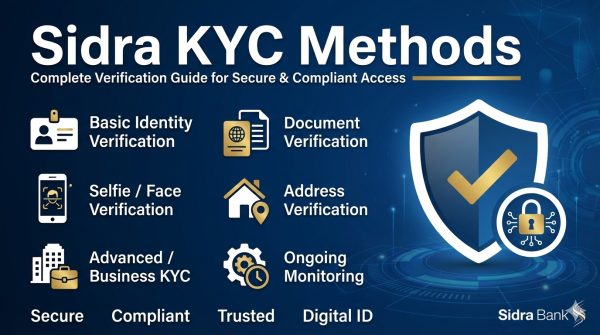
Sidra Chain KYC Guide 2026: Step‑by‑Step Identity Verification on Sidra Blockchain (KYCPORT Methods)
Table of Contents
- Introduction: Why KYC Matters on Sidra Chain
- Understanding Sidra Chain and Its KYC Architecture
- Prerequisites Before Starting the Verification Process
- Overview of KYCPORT Methods
- Step‑by‑Step Walkthrough of the KYCPORT Process
- Real‑World Example: Jane’s First Transaction on Sidra
- Common Issues & Troubleshooting Tips
- Security Best Practices for KYC Participants
- Frequently Asked Questions (FAQ)
- Conclusion
Introduction: Why KYC Matters on Sidra Chain {#introduction-why-kyc-matters-on-sidra-chain}
The decentralized finance (DeFi) ecosystem has matured dramatically over the past few years, yet regulatory compliance remains a key differentiator for projects that aim for mainstream adoption. Sidra Chain, a next‑generation Layer‑1 blockchain built for high‑throughput, low‑latency financial operations, integrates a robust Know‑Your‑Customer (KYC) framework directly into its protocol. This integration, branded as KYCPORT, enables seamless identity verification without sacrificing user privacy or network decentralization.
The 2026 KYC guide walks you through every stage of the verification journey, from preparing your digital wallet to receiving on‑chain identity anchoring. Whether you are a seasoned crypto enthusiast or a newcomer looking to trade assets on Sidra, mastering the KYCPORT workflow ensures you can participate safely, comply with global regulations, and unlock the full suite of features offered by the network.
Understanding Sidra Chain and Its KYC Architecture {#understanding-sidra-chain-and-its-kyc-architecture}
1. Core Characteristics of Sidra Chain
- High Throughput: Up to 15,000 transactions per second (TPS) with sub‑second finality.
- Modular Consensus: Hybrid Proof‑of‑Stake (PoS) + BFT (Byzantine Fault Tolerant) mechanism for security and scalability.
- Native Asset Model: Supports both fungible and non‑fungible assets with built‑in compliance hooks.
2. KYC Integration Philosophy
Sidra does not treat KYC as an afterthought; it is baked into the protocol:
| Feature | Benefit | Technical Detail |
|---|---|---|
| On‑Chain Identity Anchors | Immutable proof of verified identity | SHA‑256 hash of KYC data stored in a dedicated IdentityRegistry smart contract |
| Zero‑Knowledge Proofs (ZK‑Proofs) | Privacy‑preserving verification | Users can prove attributes (e.g., age > 18) without revealing raw data |
| Decentralized Identity (DID) Standards | Interoperability with external wallets | Compliance with W3C DID spec and Verifiable Credentials (VC) model |
| Automated Compliance Engine | Real‑time sanction screening | Integrated with global watch‑list APIs via off‑chain oracles |
The result is a verification flow that respects user sovereignty while delivering the auditability required by regulators.
Prerequisites Before Starting the Verification Process {#prerequisites-before-starting-the-verification-process}
Before you can begin the KYCPORT journey, ensure the following items are in place:
- Sidra Wallet Installation
- Download the official Sidra Wallet (available for iOS, Android, and desktop).
- Create a new wallet or import an existing seed phrase.
- Enable biometric lock for added security.
- Secure Internet Connection
- Use a trusted network; avoid public Wi‑Fi when uploading sensitive documents.
- Valid Government‑Issued Identification
- Passport, national ID card, or driver’s license (must be unexpired).
- Active Email Address & Mobile Number
- Required for receiving verification links and OTP (One‑Time Password) codes.
- Digital Copies of Supporting Documents
- Proof of address (utility bill, bank statement) – optional for tier‑2 verification.
- Understanding of KYC Tiers
- Tier 1: Basic verification (identity + address).
- Tier 2: Enhanced verification (additional documentation, higher transaction limits).
- Tier 3: Full compliance (institutional KYC, large‑scale transaction thresholds).
Having these prerequisites ready will keep the process smooth and avoid unnecessary delays.
Overview of KYCPORT Methods {#overview-of-kycport-methods}
KYCPORT is the umbrella term for the suite of verification pathways on Sidra Chain. It comprises three primary methods, each tailored to different user needs:
| Method | Target Audience | Typical Use‑Case | Verification Depth |
|---|---|---|---|
| KYCPORT‑Basic | Casual users, retail traders | Small‑scale token swaps, NFT minting | Tier 1 – Identity + Address |
| KYCPORT‑Standard | Frequent traders, DeFi participants | Staking, yield farming, cross‑chain bridges | Tier 2 – Full ID + Enhanced Liveness + Credit Score |
| KYCPORT‑Premium | Institutional clients, high‑frequency traders | Large‑volume transfers, custodial services | Tier 3 – Full KYC + AML screening + On‑chain reputation score |
Each method follows a four‑stage pipeline:
- Data Submission – Upload personal identifiers.
- Live Verification – Biometric and liveness checks.
- On‑Chain Anchoring – Identity hash stored in the
IdentityRegistry. - Compliance Review – Automated and manual audit.
The subsequent sections detail each stage in depth.
Step‑by‑Step Walkthrough of the KYCPORT Process {#step‑by‑step-walkthrough-of-the-kycport-process}
Below is the canonical workflow that applies to all KYCPORT tiers. Differences appear only in the scope of documents and depth of checks.
5.1 Submit Personal Data {#submit-personal-data}
- Log into your Sidra Wallet and navigate to Settings → Identity Verification.
- Choose the appropriate KYCPORT tier (Basic, Standard, or Premium).
- Fill out the Personal Data Form with the following fields:
- Full Legal Name
- Date of Birth (YYYY‑MM‑DD)
- Nationality
- Residential Address (including postal code)
- Email Address
- Mobile Phone Number (incl. country code)
- Generate a Pre‑Verification Token – The wallet automatically creates a cryptographic token that links your submission to your wallet address. Store this token; it will be required in later steps.
Tip: Double‑check the spelling of your name and the accuracy of your address. Any mismatch will trigger a manual review.
5.2 Upload Government‑Issued ID {#upload-government‑issued-id}
- Within the verification portal, click Upload ID.
- Select a scanned image (PDF, JPEG, PNG) of a government‑issued ID (passport, driver’s license, or national ID).
- Ensure the image meets these criteria:
- Resolution: Minimum 300 dpi.
- File Size: ≤ 5 MB.
- Clarity: All text and photo must be legible; no glare or shadows.
- The system performs an optical character recognition (OCR) scan to extract the following data points:
- Document Type
- Issuing Country/Authority
- Document Number
- Expiry Date
- Once uploaded, the data is hashed (SHA‑256) and sent to the IdentityRegistry contract for temporary storage.
Example:
- Document Type: Passport
- Issuing Country: Canada
- Document Number: X12345678
- Expiry Date: 2030‑04‑30
If the OCR fails, you will receive a rejection code (e.g., OCR-001: Low contrast) prompting you to redo the scan.
5.3 Complete Biometric Verification {#complete-biometric-verification}
Biometric verification ties your physical identity to the digital submission.
- Initiate Face Capture – The wallet prompts you to position your face within the frame.
- Capture Multiple Angles – The system records up to three images:
- Front‑facing (neutral expression)
- Slight tilt (to verify depth)
- Profile view (optional)
- Liveness Detection – The SDK triggers a passive liveness algorithm that checks for:
- Blinking pattern
- Micro‑movement of facial muscles
- 3‑D depth mapping (using device sensors)
- Hashing & Storage – The resulting biometric template is encrypted (AES‑256‑GCM) and stored alongside the ID hash in the
IdentityRegistry.
Security Note: Biometric data never leaves your device unencrypted. Only the hashed template is transmitted to Sidra’s verification nodes.
5.4 Passive Liveness Check {#passive-liveness-check}
A passive liveness check adds an extra layer of assurance that the captured images belong to a live person.
- Algorithm: Uses texture analysis and motion vector detection to confirm that the face is not a static photograph or video replay.
- Outcome: Returns a Liveness Score (0‑100).
- Threshold: Scores ≥ 85 are accepted; otherwise, the verification is paused for manual review.
The result is recorded as a Liveness Verification Record (LVR) attached to your identity anchor.
5.5 On‑Chain Identity Anchoring {#on‑chain-identity-anchoring}
The final step binds your verified identity to the Sidra blockchain.
- Create Identity Anchor – The system constructs a unique Identity Anchor ID (IAID), a 256‑bit hash combining:
- SHA‑256(ID Hash)
- SHA‑256(Biometric Template)
- Timestamp (UTC)
- Submit Transaction – Your wallet sends a
RegisterIdentitytransaction containing:- IAID
- Tier designation (Basic/Standard/Premium)
- optional Zero‑Knowledge Proof (ZKP) for age or residency attributes
- Verification by Validators – Network validators run a smart‑contract audit:
- Confirm that the IAID matches the stored hash.
- Ensure the submission adheres to the selected tier’s policy.
- Confirmation – Once the transaction is included in a block, the IdentityRegistry emits an
IdentityRegisteredevent. Your wallet receives a Verification Badge (displayed on your profile) indicating that you are now a Verified Sidra Citizen.
Result: From this point forward, you can interact with any KYC‑enabled Sidra dApp without re‑submitting documents.
Real‑World Example: Jane’s First Transaction on Sidra {#real‑world-example-janes-first-transaction-on-sidra}
Background: Jane Doe, a 29‑year‑old freelance graphic designer, wants to stake 2,500 Sidra tokens (SID) on the YieldHub platform.
Step‑by‑Step Execution
| Phase | Action | Screenshot (Conceptual) |
|---|---|---|
| 1 | Jane opens the Sidra Wallet, selects KYCPORT‑Standard, and fills personal data. | ![Form Fill] |
| 2 | She uploads a scanned Canadian passport. OCR extracts: Passport # C12345678, Expiry 2029‑12‑31. |
![Upload ID] |
| 3 | Jane captures three facial images; the liveness algorithm returns a score of 92. | ![Liveness] |
| 4 | She clicks Submit; the wallet creates an IAID: 0x4f7e9c.... |
![Submit] |
| 5 | Validators confirm the transaction; the IdentityRegistered event appears on Etherscan‑like explorer. |
![Event] |
| 6 | Jane receives a Verified Badge and proceeds to stake tokens on YieldHub. | ![Badge] |
Outcome: Within 15 minutes, Jane’s identity is verified, and she can now stake, trade, and claim rewards on any KYC‑enabled Sidra dApp. Her transaction history is now linked to a trusted on‑chain identity, enabling compliance‑aware services such as tax reporting and regulatory audit trails.
Common Issues & Troubleshooting Tips {#common-issues–troubleshooting-tips}
| Issue | Symptom | Resolution |
|---|---|---|
| Document Rejection | “Upload failed – file too large” | Reduce image resolution to ≤ 5 MB; ensure file is under 5 MB. |
| OCR Extraction Errors | Missing or garbled characters in extracted data | Retake the photo with better lighting; avoid glare and shadows. |
| Liveness Score Too Low | “Liveness verification failed – score 71” | Ensure you are in a well‑lit environment; keep head steady; avoid hats/glasses that obscure facial features. |
| Network Congestion | Transaction pending > 30 seconds | Switch to a less busy time or increase gas fee (if supported). |
| Identity Anchor Conflict | “IAID already exists” | Verify you have not previously registered the same identity; otherwise, contact support. |
| Verification Stuck in Manual Review | No progress after 24 hours | Check email for a request for additional documents; provide any requested proofs promptly. |
Pro Tip: Keep a copy of all uploaded files and the verification token; they speed up manual review if needed.
Security Best Practices for KYC Participants {#security-best-practices-for-kyc-participants}
- Never Share Your Private Key – Only the wallet address should be exposed during verification.
- Use End‑to‑End Encrypted Channels – The Sidra Wallet encrypts data before transmission; verify the padlock icon before uploading.
- Enable Multi‑Factor Authentication (MFA) – Activate MFA on your email and wallet account to protect against credential theft.
- Store Backup Phrases Offline – Write the seed phrase on paper and keep it in a secure location; do not store it digitally.
- Monitor Account Activity – Review the Identity Ledger regularly for unauthorized verification attempts.
- Beware of Phishing – Official verification links always originate from
*.sidrachain.io. Do not click on unsolicited emails or messages.
Frequently Asked Questions (FAQ) {#frequently-asked-questions-faq}
Q1: How long does the KYCPORT verification take?
A: Automated verification typically completes within 5–10 minutes. Manual review, if required, may take up to 24 hours.
Q2: Can I use the same verified identity across multiple wallets?
A: Yes. The IAID is bound to your public key; you can import the same identity into any wallet that supports Sidra’s DID standard.
Q3: Will my biometric data be stored permanently on the blockchain?
A: No. Only a hashed, encrypted template is stored on‑chain. The raw biometric images remain on your device and are deleted after successful verification.
Q4: What happens if my passport expires while I am verified?
A: You must re‑submit an updated document to maintain active verification status. Expired IDs trigger an automatic tier‑downgrade until renewal.
Q5: Is there a fee for KYCPORT verification?
A: Verification is free of charge; however, transaction fees apply when you anchor your identity on‑chain (typically < 0.001 SID).
Q6: Can I delete my on‑chain identity anchor?
A: Once anchored, the identity record is immutable per protocol design. If you wish to de‑register, you can submit a RevokeIdentity transaction, which will flag the anchor as inactive.
Q7: Does KYCPORT support corporate or institutional accounts?
A: Yes. Institutional participants use KYCPORT‑Premium, which requires additional documentation (e.g., business registration, beneficial‑owner declarations).
Conclusion {#conclusion}
The 2026 Sidra Chain KYC Guide illustrates how the network’s KYCPORT methodology transforms identity verification from a cumbersome, siloed process into an integrated, privacy‑preserving, and blockchain‑native experience. By following the step‑by‑step workflow—submitting accurate personal data, uploading clear government‑issued IDs, passing biometric and liveness checks, and anchoring your identity on‑chain—you unlock a suite of trusted, compliant interactions across Sidra’s DeFi ecosystem.
Whether you are a casual retail user seeking to stake tokens, a developer building KYC‑aware dApps, or an institution looking to leverage Sidra’s high‑throughput infrastructure, mastering the KYCPORT process ensures you can transact with confidence, meet regulatory expectations, and fully participate in the next generation of decentralized finance.
Ready to get verified? Open your Sidra Wallet, navigate to Identity Verification, and embark on your journey as a certified citizen of the Sidra blockchain today.